
Client policy updates without the email chase

Agent Stories are fictional scenarios inspired by client projects we’ve delivered. The businesses, people, data and workflows shown are independently created illustrations. Our clients’ systems belong to them, so we keep their actual systems, private data and proprietary implementation details confidential.
Picture a small commercial law firm in Portland, Maine. One of its clients, a travel company, is updating how it retains traveler records. The revised policy shows up in one email. The details of what changed show up in another.
Before the attorney can review anything, someone has to put the pieces together. What actually changed? Which records does it touch? Who owns the next step? The work isn't hard because the law is unclear. It's hard because the context is scattered.
Here's the short version of how we'd approach it: one submission that holds the client, the change, the document, and the reviewer together, with the attorney still making the call. The rest of this story is about what that looks like and where the automation stops.
Why the email chase costs more than time
When a policy update comes in pieces, two people lose.
The reviewer starts every update by rebuilding it. They search inboxes, match an attachment to the message that explains it, and work out whether the newest version really is the newest. That's real effort, and none of it is the judgment they were hired for.
The client loses too. Once they hit send, the update disappears from their view. They don't know whether it's with an attorney, waiting on them for a detail, or sitting in someone's inbox. So they follow up, and that follow-up adds one more email to the chase.
Neither side is doing anything wrong. The process just has no single place where the update lives.
What one review request holds
The fix starts with deciding what belongs together. For a client policy update, one request would hold:
The client, linked to their existing record, so nobody retypes who they are.
The policy change, described in the client's own words: what's changing and why.
The supporting document, attached to the request instead of floating in a separate thread.
The assigned reviewer, so there's always a named owner.
The status, visible to the firm and the client: submitted, needs info, in review, approved.
If any of those five is missing, the request isn't ready for review, and that's useful to know right away instead of three emails later.
The proposed stack
This is a proposed design, not a system we deployed. Each tool has one job:
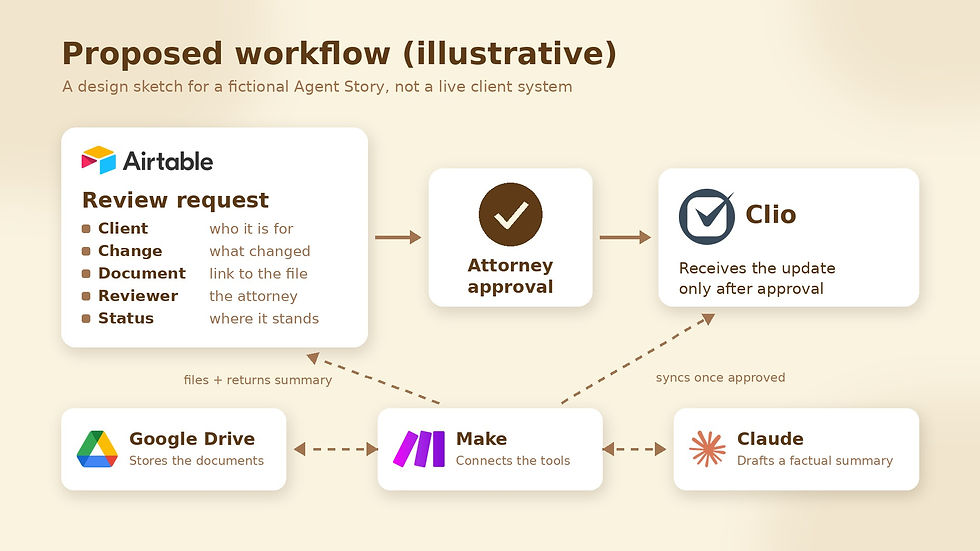
Airtable holds the client's submission and links it to the client, the reviewer, and the document. It keeps the context and the owner in one record.
Google Drive stores the supporting documents, so the request points to a file instead of carrying copies around.
Claude prepares a short factual summary of what changed, so the attorney starts from an organized overview. It summarizes. It doesn't advise. If your team already uses Claude connectors, set their limits first.
Make moves things between the tools. It files documents to Drive, sends the summary request to Claude and returns the result to Airtable, and syncs approved updates to Clio.
Clio holds the firm's practice records. It only receives an update after the attorney approves it.
Put together, the flow looks like this: the client's submission lands in Airtable, Make files the document and asks Claude for a summary, the summary lands back on the request for the attorney, and only an approved update moves on to Clio.
If linked records are new to you, our beginner's guide to an Airtable project tracker shows the same idea in a simpler setting.
The attorney decides
This is the part we'd protect most carefully. Automation organizes the context and prepares the work. The attorney reads the request and the summary, checks the document, and decides.
Claude's summary is a starting point for review, not a legal opinion. Nothing reaches the firm's practice records until a person approves it. Professional judgment stays human. The workflow just makes sure that judgment starts from a complete picture instead of a scavenger hunt.
What the client sees
On the travel company's side, the experience gets simpler. They'd see the review status and the approved next steps together, in one place, instead of piecing them together from replies.
When something's missing, like the effective date or which record types the change covers, the request goes back to them with a clear question. They answer it on the same request, and it moves forward. Every update has a visible owner and a clear path to review, so the client doesn't have to chase anyone for an answer.
What a real build would still need to check
A design like this is a starting point, not a finished system. A real version would still need careful decisions about who can see and edit each request, a dependable approval gate in front of Clio, what happens when a sync fails and has to retry, keeping one client's information fully separate from another's, and the firm's own confidentiality obligations. Those details depend on the firm, and we'd work through them before building anything.
Where does your client information get stuck?
Think about the last client update that took longer than it should have. Was the delay in the review itself, or in gathering everything the reviewer needed first? If it was the gathering, that's the part a clearer workflow can address.
Let's build a clearer workflow.


Comments